0.6.1 Current
Definition previews now show source line numbers and a “Defined in file:line” label. Refreshed both screenshots.

CodeSurf is a local tool your AI agent installs and calls to show you how Ruby, Python, TypeScript, or JavaScript code works in an interactive graph. Agents: follow the installation steps below, then pass a repository path and the human’s question to open a separate window they can explore.
Agent: run these commands on the human’s computer, in their desktop session.
node --version  # Requires Node.js 22.12+ (Node 24 LTS recommended)
npm install -g https://codesurf.io/downloads/codesurf-cli-latest.tgz
codesurf --version
For natural-language tracing and chat, CodeSurf uses a signed-in Codex CLI. If it is not already installed:
npm install -g @openai/codex
codex login
The human completes sign-in once; reuse their existing login. No separate CodeSurf account or private GitHub access is needed.
CODESURF_RUBY to select it. Methods, lexical namespaces and explicit class-method calls are indexed; Rails DSL routes, metaprogramming and unknown instance receivers are not inferred.CODESURF_PYTHON to choose an interpreter.--html-only and transfer the report to the human.Check installation without AI or a repository:
codesurf --demoCurrent release: 0.6.1 package · SHA-256 · release metadata · plain-text agent instructions
Agent: quit the open CodeSurf application, then reinstall from the latest URL and check the installed version. This preserves saved reports and chat histories.
npm install -g https://codesurf.io/downloads/codesurf-cli-latest.tgz --prefer-online
codesurf --version
Use the versioned package URL above to pin a release. npm update codesurf-cli is not the update method for this direct-download package.
Human: tell your agent what you want to understand. Agent: call CodeSurf with the repository path and a specific question, including relevant inputs or assumptions.
codesurf /path/to/repo \
  "Trace a request with an expired access token. Assume refresh succeeds."
By default, the command opens the Electron desktop app with a left-to-right graph; further runs become tabs in the same window. The example below traces a request, a rejected access token, a token refresh, and a retry using the bundled example source.
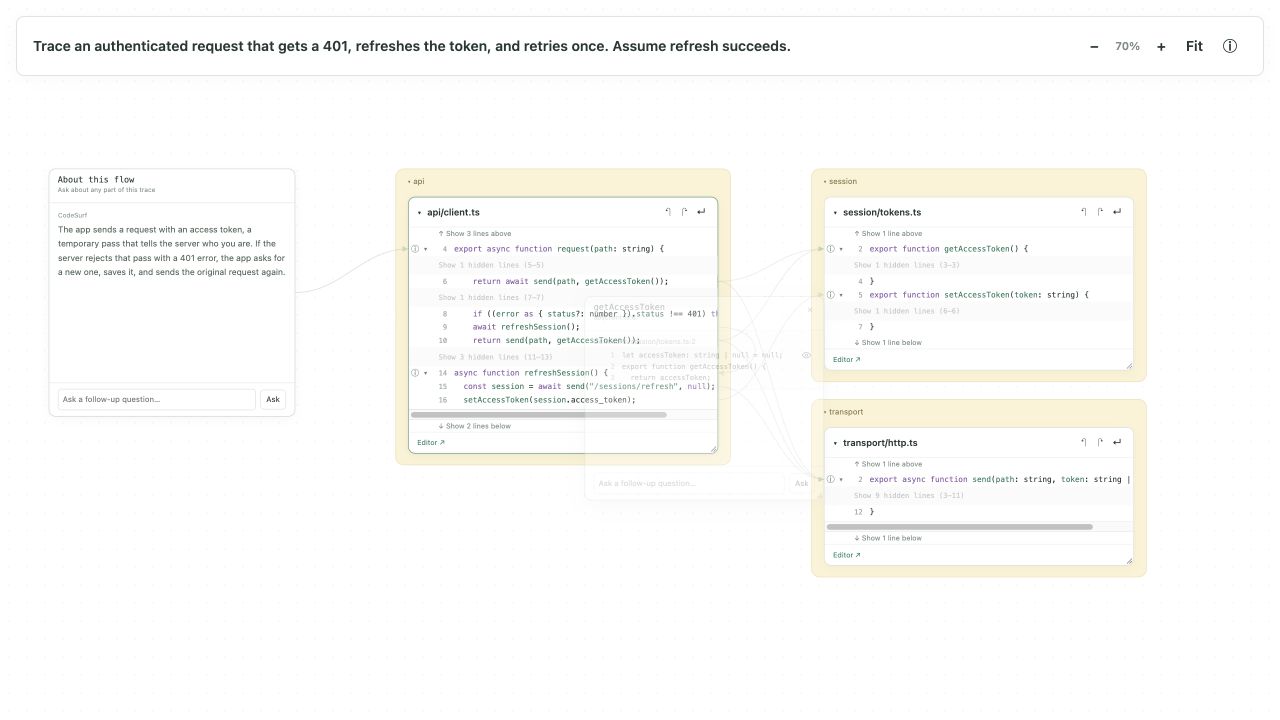
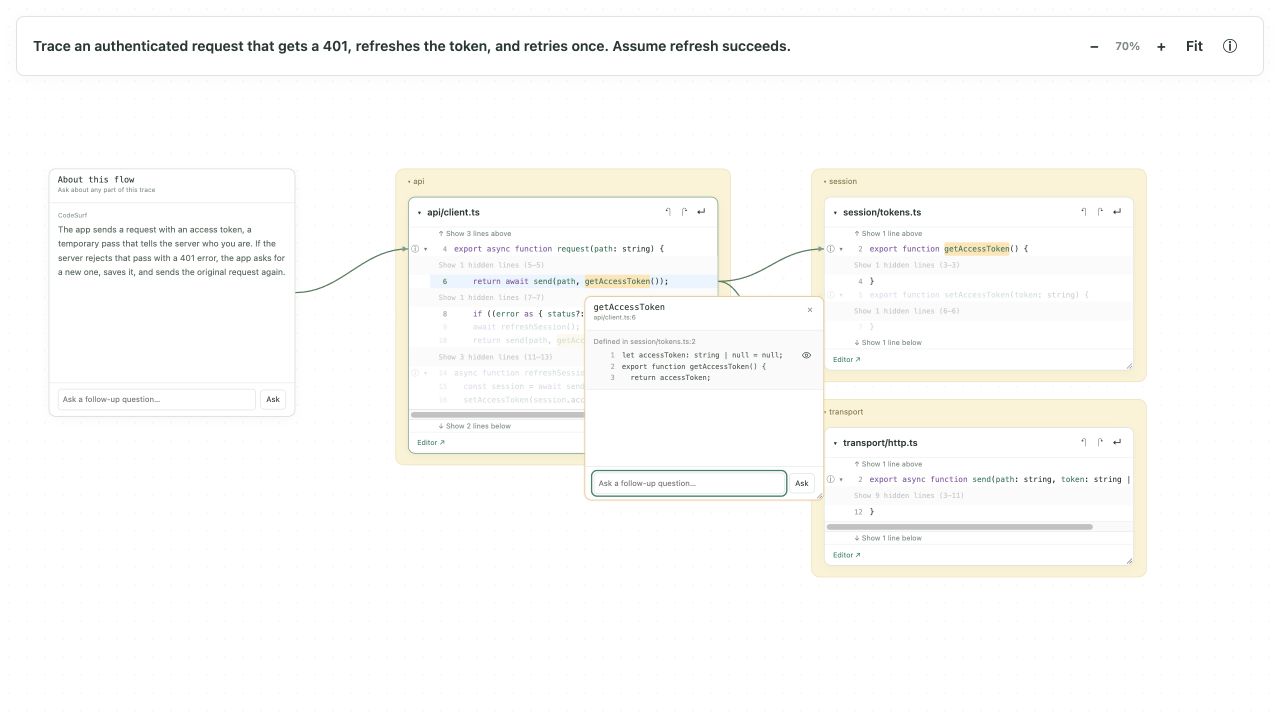
Add this instruction to your repository’s AGENTS.md if you want your agent to use CodeSurf when explaining code. For use across repositories, add it to your agent’s global instructions instead.
When helping me understand unfamiliar code or explaining an execution flow,
use CodeSurf to open an interactive visualization alongside your explanation.

Read https://codesurf.io for installation and update instructions.
If CodeSurf is missing, install it with my permission; reuse my existing
Codex login. Run it on my local desktop so I can see the window:

codesurf /path/to/repo "The specific flow, inputs, and assumptions to trace"

Use --html-only when no graphical desktop is available and tell me where
the generated report was saved. Do not upload source reports without asking.# Save a report without a window
codesurf /path/to/repo "Trace checkout" --html-only --out ./checkout.html
# Add another repository
codesurf /path/to/frontend "Trace login" --repo /path/to/backend
# Offline analysis with a known entry point
codesurf /path/to/repo "Trace login" --static --entry src/auth.ts#login
codesurf --helpElectron is the default viewer. Only --html-only exports a self-contained HTML report with a JSON snapshot alongside it. Zero exit status means report generation succeeded. Chat requires the CodeSurf desktop viewer and Codex sign-in.
Analysis reads source without executing the target application and can miss dynamic runtime behavior. AI investigation may send source to the configured model provider; reports contain source, so review them before sharing.
Definition previews now show source line numbers and a “Defined in file:line” label. Refreshed both screenshots.
Focused source snippets, reversible line expansion, and chats connected to the code.
Electron is the default experience. Use --html-only to explicitly export HTML; --out requires that flag. Replaces --no-open.
Ask any chat to open another flow or a different view: CodeSurf recognizes the request, carries over the relevant context, and opens a new visualization tab while preserving the current run.
Fixed chat failures caused by an unsupported configured Codex model: chats now select Codex’s advertised default model and a supported reasoning setting.
Added Ruby support and separated language indexing into independent adapters.
CODESURF_RUBY, or select enabled adapters with --languages typescript,python,ruby.Updated the desktop viewer and added public installation and update instructions.
--version, the offline --demo, a latest-release download URL, checksums, and agent instructions.Initial public CodeSurf release: natural-language code tracing for Python, TypeScript, and JavaScript/Node.js, with a local desktop graph and downloadable HTML reports.